> ## Documentation Index
> Fetch the complete documentation index at: https://docs.boltz.bio/llms.txt
> Use this file to discover all available pages before exploring further.
# Purchasing Small Molecules
> How to order synthesizable compounds from your virtual screening results via Enamine
***
## Overview
After completing your virtual screening campaign and identifying promising candidates, you can seamlessly transition from in silico predictions to compound procurement.
The small molecule agent within Boltz Lab searches Enamine's synthesis-on-demand services, any molecule generated can be purchased from the **Enamine REAL Space** (\~75B compounds).
All generative screens using "Enamine REAL Space" chemical space filtering produce molecules that are theoretically synthesizable through Enamine's building block library.
If you have you have your own synthesis team, you can synthesize molecules yourself. Using the small molecule agent does not obligate purchasing.
***
## Workflow: From Results to Purchase
Use the Table or Triage UI to collaboratively evaluate your virtual screen output:
* **Upvote** molecules you favor based on predicted binding and properties
* **Flag** molecules for team discussion or further analysis
* **Tag** molecules with contextual labels (e.g., "high-affinity", "lead-like")
Use keyboard shortcuts for rapid triage: **←→** to navigate, **3** for upvote+flag, **2** for flag, **1** for downvote
After triage and team review, mark your final selection as **'active'** by clicking the ⭐ star icon:
* In the **Table view**: Click the star in the "ID and Tags" column
* In the **Triage UI**: Use the star action button
Active molecules are automatically added to your Design Project **Catalog**.
Navigate to the **Catalog** from your Design Project dashboard to view all active molecules across your experiments.
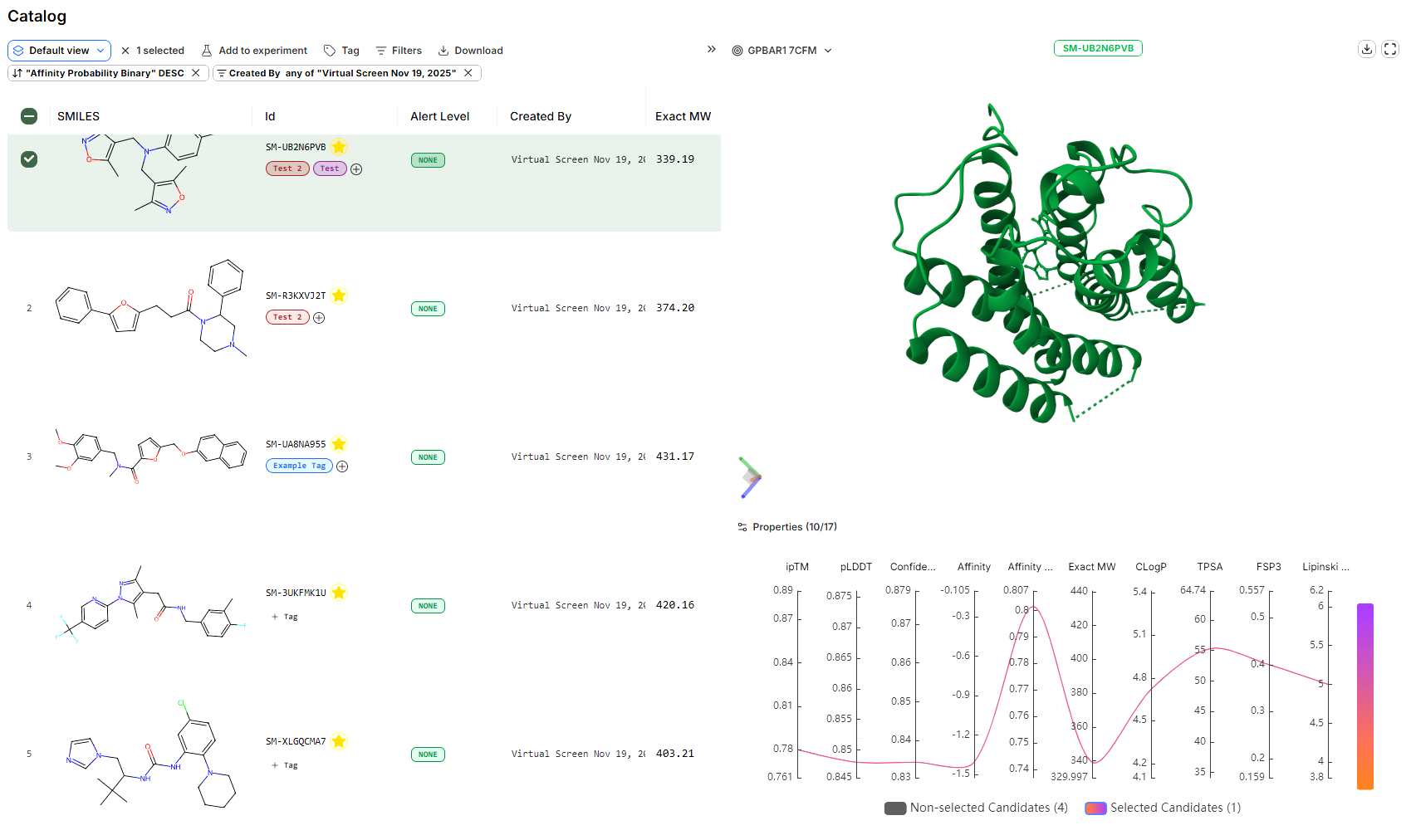 The \*\*Catalog \*\*functions as your curated shortlist of molecules for procurement and provides the same filtering and analysis tools as the Results Table.
From the Catalog:
1. **Select molecules** using the checkboxes (or select all)
2. Click the **Download** button in the top menu
3. Export as **TSV** format
The file will contain SMILES strings and all associated prediction data for your selected molecules.
Send your exported SMILES strings to Enamine using the contact information below. Include:
* **SMILES strings** from your downloaded file
* **Quantities** required for each compound
* **Purity specifications** (if applicable)
* **Timeline** for delivery
Enamine will provide a quote for synthesis and timeline estimates.
***
## Enamine Contact Information
**Enamine US Inc.**
Phone: (732) 274 9150
Toll Free: +1 888 745 6132
Email: [sales\_usa@enamine.net](mailto:sales_usa@enamine.net)
**Enamine LV SIA**
Phone: +371 29 473 022
Email: [sales\_europe@enamine.net](mailto:sales_europe@enamine.net)
**Enamine LTD**
Phone: +380 44 333 5601
Email: [info@enamine.net](mailto:info@enamine.net)
***
## Important Notes
**Enamine REAL Space vs. Website:**
Boltz Lab screens the complete **\~75 billion compound** Enamine REAL virtual space. The Enamine website displays only a subset of this library.
**If you cannot find your molecule on the Enamine website, this is normal.** Email Enamine directly with your SMILES strings to confirm availability and obtain accurate quotes.
**Synthesis Timeline:**
Most compounds from the REAL Space can be synthesized on-demand within 3-6 weeks, depending on complexity and quantity. Enamine will provide specific timelines when you request a quote.
**Ordering Best Practices:**
* Start with small quantities (2-10 mg) for initial validation experiments
* Request standard purity (≥90%) unless high purity (≥95%) is essential for your assays
* Order in batches to optimize shipping costs
* Plan ahead - allow 4-8 weeks from quote to delivery for typical orders
***
## Alternative Procurement Options
### Custom Library Screening
If you have preferred compound vendors or internal libraries:
1. Export molecules from your Catalog as CSV
2. Share SMILES strings with your preferred synthesis provider
3. Many CRO partners can synthesize compounds from SMILES specifications
### Cross-Vendor Validation
For high-priority leads:
1. Request quotes from multiple synthesis providers
2. Compare pricing, timelines, and purity specifications
3. Consider ordering duplicates for critical validation studies
***
## Troubleshooting
While most REAL Space compounds are synthesizable, some edge cases may require:
* Modified building blocks (may increase cost/timeline)
* Alternative synthesis routes (discuss with Enamine)
* Selecting a structurally similar analog from your results
Enamine will advise on feasibility when you request a quote.
Yes! If you uploaded a custom library or screened pre-computed vendor libraries:
* Check the original source of your molecules
* Contact the vendor directly with SMILES or compound IDs
* Many vendors offer direct purchasing through their websites
We recommend maintaining a spreadsheet with:
* Boltz molecule ID
* SMILES string
* Enamine quote reference
* Order date and expected delivery
* Batch/lot numbers upon receipt
You can also use Tags in the Catalog to mark "Ordered", "In Transit", "Received" for tracking within Boltz Lab.
***
## Next Steps
After receiving your compounds:
1. **Experimental Validation**: Run biochemical or cell-based binding assays
2. **Hit Expansion**: Use validated hits as templates for generative design or manual optimization in the Design Hub, or via CSV uplaod
3. **Iterate**: Run follow-up virtual screens focused on validated chemotypes
Have questions about compound procurement? Contact our support team at [support@boltz.bio](mailto:support@boltz.bio)
The \*\*Catalog \*\*functions as your curated shortlist of molecules for procurement and provides the same filtering and analysis tools as the Results Table.
From the Catalog:
1. **Select molecules** using the checkboxes (or select all)
2. Click the **Download** button in the top menu
3. Export as **TSV** format
The file will contain SMILES strings and all associated prediction data for your selected molecules.
Send your exported SMILES strings to Enamine using the contact information below. Include:
* **SMILES strings** from your downloaded file
* **Quantities** required for each compound
* **Purity specifications** (if applicable)
* **Timeline** for delivery
Enamine will provide a quote for synthesis and timeline estimates.
***
## Enamine Contact Information
**Enamine US Inc.**
Phone: (732) 274 9150
Toll Free: +1 888 745 6132
Email: [sales\_usa@enamine.net](mailto:sales_usa@enamine.net)
**Enamine LV SIA**
Phone: +371 29 473 022
Email: [sales\_europe@enamine.net](mailto:sales_europe@enamine.net)
**Enamine LTD**
Phone: +380 44 333 5601
Email: [info@enamine.net](mailto:info@enamine.net)
***
## Important Notes
**Enamine REAL Space vs. Website:**
Boltz Lab screens the complete **\~75 billion compound** Enamine REAL virtual space. The Enamine website displays only a subset of this library.
**If you cannot find your molecule on the Enamine website, this is normal.** Email Enamine directly with your SMILES strings to confirm availability and obtain accurate quotes.
**Synthesis Timeline:**
Most compounds from the REAL Space can be synthesized on-demand within 3-6 weeks, depending on complexity and quantity. Enamine will provide specific timelines when you request a quote.
**Ordering Best Practices:**
* Start with small quantities (2-10 mg) for initial validation experiments
* Request standard purity (≥90%) unless high purity (≥95%) is essential for your assays
* Order in batches to optimize shipping costs
* Plan ahead - allow 4-8 weeks from quote to delivery for typical orders
***
## Alternative Procurement Options
### Custom Library Screening
If you have preferred compound vendors or internal libraries:
1. Export molecules from your Catalog as CSV
2. Share SMILES strings with your preferred synthesis provider
3. Many CRO partners can synthesize compounds from SMILES specifications
### Cross-Vendor Validation
For high-priority leads:
1. Request quotes from multiple synthesis providers
2. Compare pricing, timelines, and purity specifications
3. Consider ordering duplicates for critical validation studies
***
## Troubleshooting
While most REAL Space compounds are synthesizable, some edge cases may require:
* Modified building blocks (may increase cost/timeline)
* Alternative synthesis routes (discuss with Enamine)
* Selecting a structurally similar analog from your results
Enamine will advise on feasibility when you request a quote.
Yes! If you uploaded a custom library or screened pre-computed vendor libraries:
* Check the original source of your molecules
* Contact the vendor directly with SMILES or compound IDs
* Many vendors offer direct purchasing through their websites
We recommend maintaining a spreadsheet with:
* Boltz molecule ID
* SMILES string
* Enamine quote reference
* Order date and expected delivery
* Batch/lot numbers upon receipt
You can also use Tags in the Catalog to mark "Ordered", "In Transit", "Received" for tracking within Boltz Lab.
***
## Next Steps
After receiving your compounds:
1. **Experimental Validation**: Run biochemical or cell-based binding assays
2. **Hit Expansion**: Use validated hits as templates for generative design or manual optimization in the Design Hub, or via CSV uplaod
3. **Iterate**: Run follow-up virtual screens focused on validated chemotypes
Have questions about compound procurement? Contact our support team at [support@boltz.bio](mailto:support@boltz.bio)