> ## Documentation Index
> Fetch the complete documentation index at: https://docs.boltz.bio/llms.txt
> Use this file to discover all available pages before exploring further.
# Overview
> Collaborative workspaces for small-molecule design within Boltz Lab
Design Projects are shared workspaces where team members within an organization can collaborate on projects.
They facilitate hypothesis-driven phases of a research project and provide a space to collate knowledge, designs and predictions in an organized and accessible hierarchy.
By default, all work is visible to everyone within your organization.
## Project Hierarchy
Boltz Lab provides a hierarchy organisation to organise Design Projects and provide structure:
Worked on by a team of scientists, optimizing small-molecules against one or more **Targets**. Contains **Experiments** as sequential or parallel phases of the DMTA cycle.
A single or collection of **Virtual Screens** used to assess Boltz binding poses and affinity scores for a particular hypothesis.
A collection of small-molecule designs for assessment against a **Target**. Can range from small bespoke designs to large commercial libraries.
A Design Project will contain multiple experiments, and an experiments will contain one or more Virtual Screens to fulfill its aim.
***
## Creating a Design Project
Click **Design Projects** to get started.
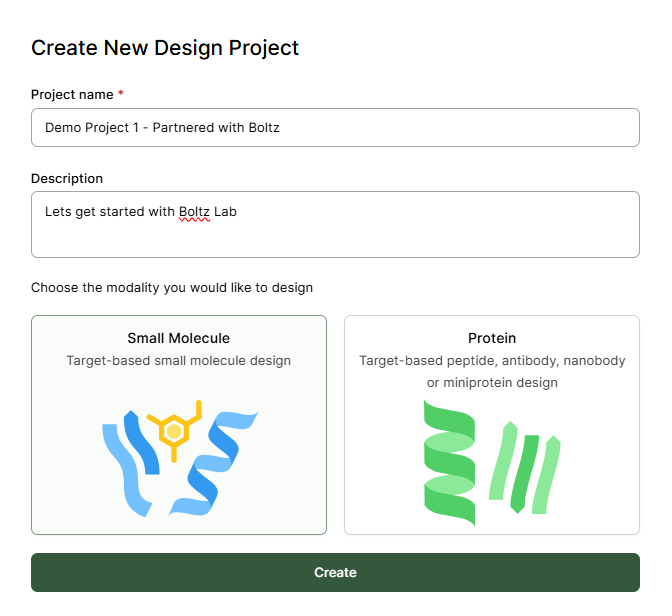
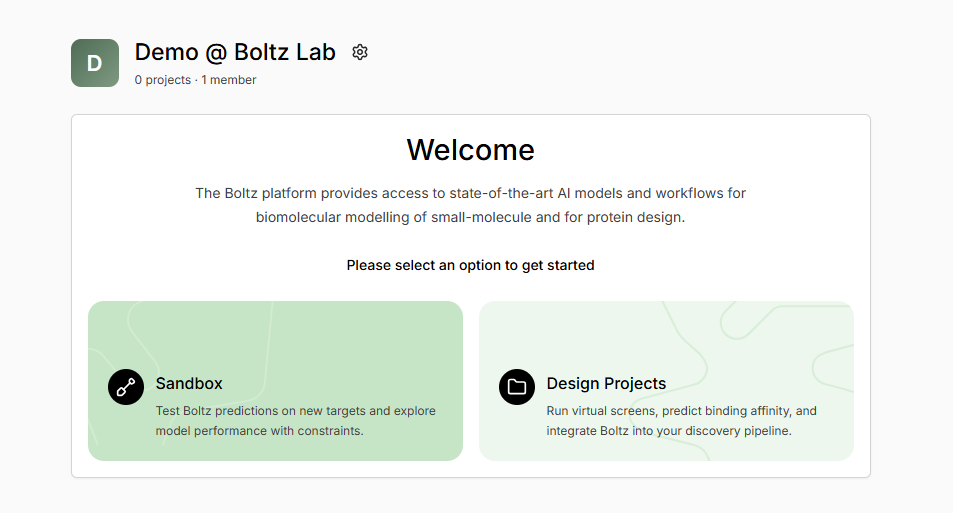 Provide a project name, and select whether it is for designing small-molecule or protein binders. For this section, we will focus on small molecules.
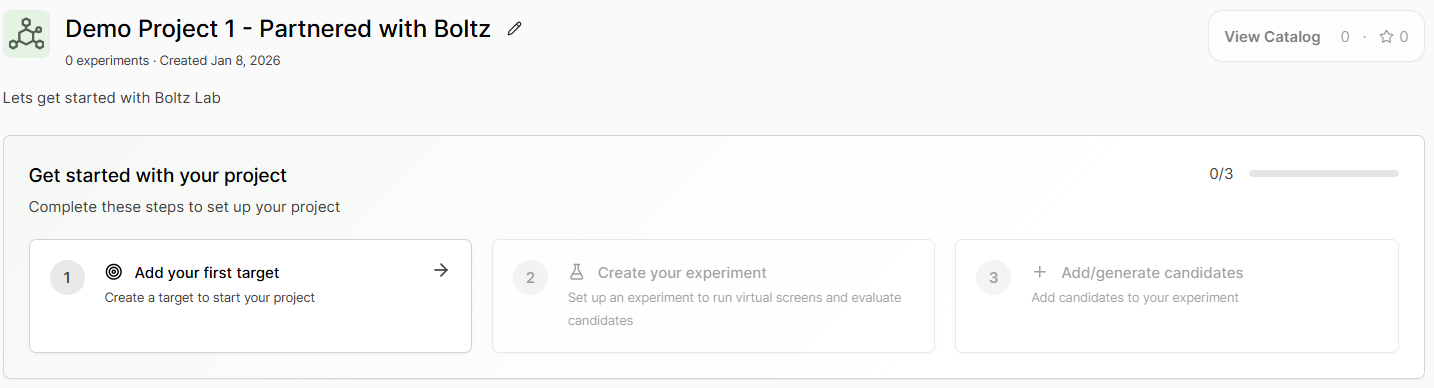
 The in-built tutorial will guide you on how to **Get started with your project**, with additional guidance continuing in the Boltz Lab documentation
 ***
## Design Project Guidance and Tips
### Experiment Examples
Good experiment hypotheses are specific and actionable:
**Name:** Pocket A Hit Finding Campaign
**Hypothesis:** Identified Pocket A on target Kinase X as having potential for pharmacological function. Screening 60,000 generated molecules to find hit starting matter for a drug discovery campaign.
**Name:** WT Kinase Series 1
**Hypothesis:** Exploring H-bond donors at R2 position of series core to improve kinase binding affinity to wild-type Kinase A, while maintaining solubility. Enumerated library from Supplier building-block library.
**Name:** Screening of Vendor Library A
**Hypothesis:** Commercial vendors supply libraries of privileged scaffold binders for the class of proteins my Target belongs to. This screen will upload that vendor csv file, and screen 1200 high fidelity molecules for our target.
**Name:** Binding Pose Evaluation of Project Y Chemical Matter
**Hypothesis:** Adding pre-existing Project Y molecules to the platform to integrate Boltz into pipeline. Screen of back-catalog of chemical matter to fully evaluate binding poses and affinity scores using the Boltz models.
### Virtual Screen Sources
Virtual screens can come from diverse sources:
* Small, uploaded bespoke designs
* Large commercial vendor or uploaded libraries
* Generative design campaign, using Boltz AI models to propose new candidates
Once a virtual screen is complete, it can be **Triaged** within the platform.
***
***
## Design Project Guidance and Tips
### Experiment Examples
Good experiment hypotheses are specific and actionable:
**Name:** Pocket A Hit Finding Campaign
**Hypothesis:** Identified Pocket A on target Kinase X as having potential for pharmacological function. Screening 60,000 generated molecules to find hit starting matter for a drug discovery campaign.
**Name:** WT Kinase Series 1
**Hypothesis:** Exploring H-bond donors at R2 position of series core to improve kinase binding affinity to wild-type Kinase A, while maintaining solubility. Enumerated library from Supplier building-block library.
**Name:** Screening of Vendor Library A
**Hypothesis:** Commercial vendors supply libraries of privileged scaffold binders for the class of proteins my Target belongs to. This screen will upload that vendor csv file, and screen 1200 high fidelity molecules for our target.
**Name:** Binding Pose Evaluation of Project Y Chemical Matter
**Hypothesis:** Adding pre-existing Project Y molecules to the platform to integrate Boltz into pipeline. Screen of back-catalog of chemical matter to fully evaluate binding poses and affinity scores using the Boltz models.
### Virtual Screen Sources
Virtual screens can come from diverse sources:
* Small, uploaded bespoke designs
* Large commercial vendor or uploaded libraries
* Generative design campaign, using Boltz AI models to propose new candidates
Once a virtual screen is complete, it can be **Triaged** within the platform.
***