> ## Documentation Index
> Fetch the complete documentation index at: https://docs.boltz.bio/llms.txt
> Use this file to discover all available pages before exploring further.
# Quickstart
> Signed up to Boltz Lab and want to begin predicting? This is the place for you.
This documentation gives an overview of all the features and capabilities that Boltz Lab has to offer. \
\
**TLDR?** - We completely understand!\
\
We have tried to design the platform to be easy to use. So getting started with your first prediction is a good way of learning as you go.
This Quickstart guide will get your first prediction submitted as quickly as possible.
***
## Essential: Sandbox vs Design Projects
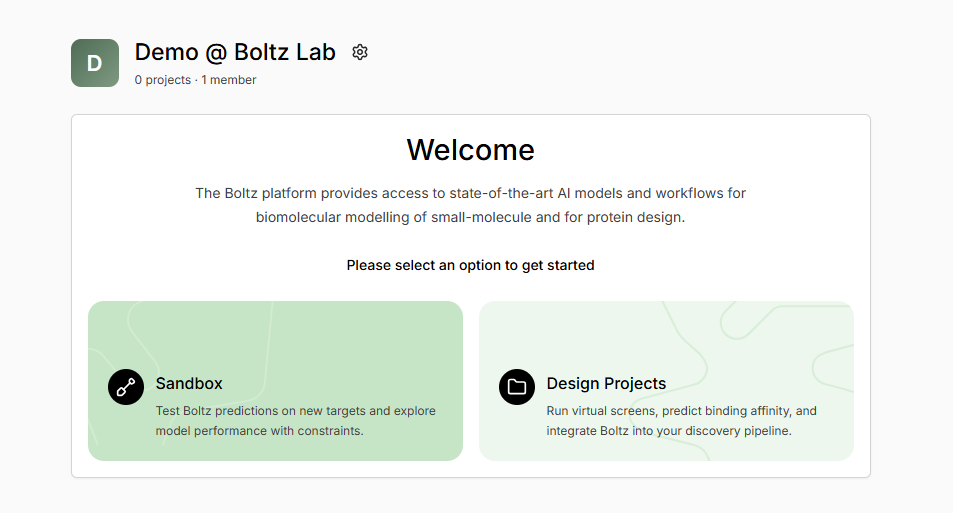 Not sure which to use? Here's a quick comparison:
| Feature | Sandbox | Design Projects |
| :---------------------- | :---------------------------- | :--------------------------------------- |
| **Best for** | Quick experiments, validation | Systematic campaigns, team collaboration |
| **Visibility** | Private (you only) | Shared with team |
| **Virtual Screening** | ✗ | ✓ (thousands of molecules) |
| **Generative Design** | ✗ | ✓ (AI-powered molecular generation) |
| **Affinity Prediction** | ✓ | ✓ |
| **Constraints** | ✓ | ✓ |
| **Results Storage** | Personal history | Project-organized |
Start in Sandbox to validate your target and binding site, then move to a Design Project when you're ready to screen compound libraries, run generative campaigns, or simply manually test different hypotheses.
***
## Quick Start
Navigate to **Sandbox** from the Welcome box, or from the top menu bar
Click **+ New Prediction** to launch the prediction wizard
Import your protein (from PDB or sequence) and ligand (SMILES, structure, or CCD code)
Add bond, contact, or pocket constraints to guide the prediction
Click **Submit Prediction** and results typically arrive in 1-3 minutes
Not sure which to use? Here's a quick comparison:
| Feature | Sandbox | Design Projects |
| :---------------------- | :---------------------------- | :--------------------------------------- |
| **Best for** | Quick experiments, validation | Systematic campaigns, team collaboration |
| **Visibility** | Private (you only) | Shared with team |
| **Virtual Screening** | ✗ | ✓ (thousands of molecules) |
| **Generative Design** | ✗ | ✓ (AI-powered molecular generation) |
| **Affinity Prediction** | ✓ | ✓ |
| **Constraints** | ✓ | ✓ |
| **Results Storage** | Personal history | Project-organized |
Start in Sandbox to validate your target and binding site, then move to a Design Project when you're ready to screen compound libraries, run generative campaigns, or simply manually test different hypotheses.
***
## Quick Start
Navigate to **Sandbox** from the Welcome box, or from the top menu bar
Click **+ New Prediction** to launch the prediction wizard
Import your protein (from PDB or sequence) and ligand (SMILES, structure, or CCD code)
Add bond, contact, or pocket constraints to guide the prediction
Click **Submit Prediction** and results typically arrive in 1-3 minutes