> ## Documentation Index
> Fetch the complete documentation index at: https://docs.boltz.bio/llms.txt
> Use this file to discover all available pages before exploring further.
# Example Bond: Covalent Inhibitors
> Guide to modeling covalent inhibitors using the Bond constraint in Sandbox mode
***
## Introduction
This guide will use the covalent inhibitor AMG 510 bound to KRAS G12C (PDB Code 6OIM) as an example prediction.
Modeling of covalent inhibitors is enabled within Boltz Lab, and currently limited to the Sandbox mode.
To specify a covalent bond, use the \*\*Bond \*\*constraint option on the \*\*Constraints \*\*page. This allows you to define which atoms should form a covalent connection between your ligand and protein residue.
***
## Submitting a Prediction
### Step 1: Create New Prediction
In Sandbox, click **New Prediction** to get started.
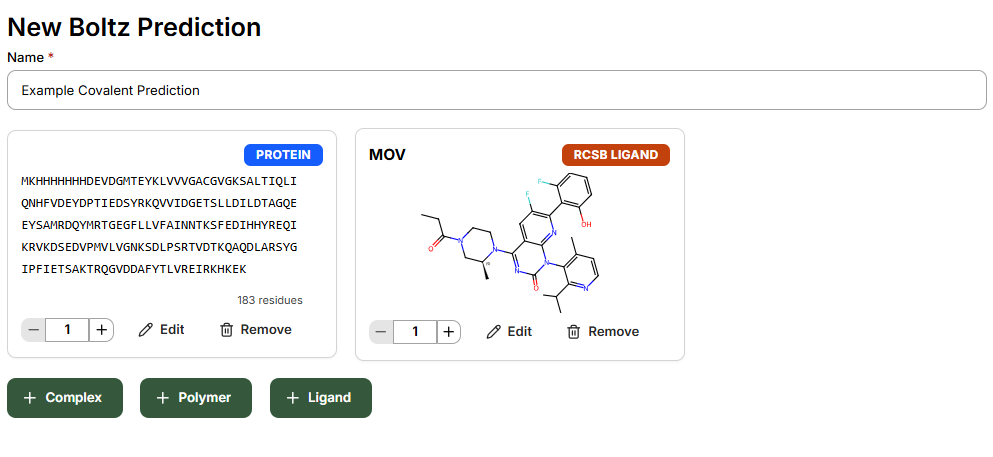
After naming your prediction with an identifiable description, add:
* Target protein
* Post-modified small molecule
* Any cofactors to be included in the complex
In this example, to model the bound acrylamide warhead, add the SMILES string for AMG 510 containing an ethyl-substituted amide.
 ### Step 2: Configure Bond Constraint
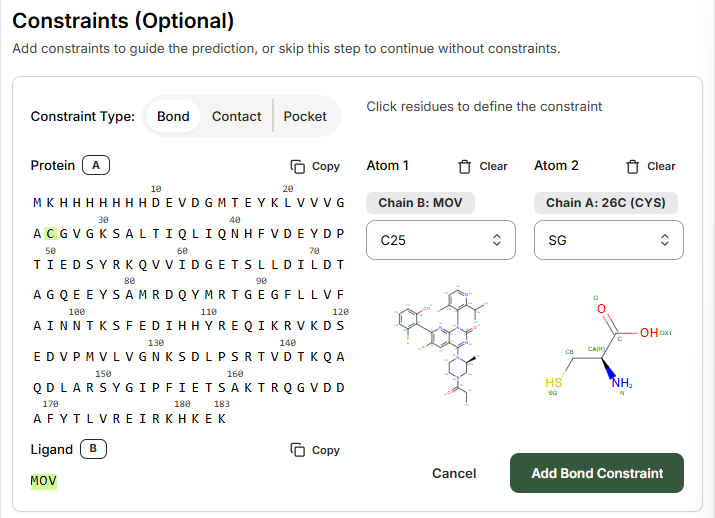
On the **Constraints** page, select **Bond** to guide the prediction. The Bond constraint is used to specify a covalent bond between different atoms in the complex.
1. **Select the Protein residue** that you wish the model to covalently modify
2. **Select the Ligand** from the left-hand side
For PDB ID 6OIM, choose:
* **Ligand**: MOV
* **Residue number**: 26
### Step 2: Configure Bond Constraint
On the **Constraints** page, select **Bond** to guide the prediction. The Bond constraint is used to specify a covalent bond between different atoms in the complex.
1. **Select the Protein residue** that you wish the model to covalently modify
2. **Select the Ligand** from the left-hand side
For PDB ID 6OIM, choose:
* **Ligand**: MOV
* **Residue number**: 26
 ### Step 3: Define Atom Connections
Using the right-hand side drop-down menus and atom labeling schematic, select the atoms to be connected.
In this example:
* **Ligand atom**: C25
* **Protein residue atom**: SG
Click **Add Bond Constraint**, and continue through the remaining steps.
***
## Viewing Results
When inspecting the predicted structure, the covalent bond between ligand and protein is now present.
### Step 3: Define Atom Connections
Using the right-hand side drop-down menus and atom labeling schematic, select the atoms to be connected.
In this example:
* **Ligand atom**: C25
* **Protein residue atom**: SG
Click **Add Bond Constraint**, and continue through the remaining steps.
***
## Viewing Results
When inspecting the predicted structure, the covalent bond between ligand and protein is now present.
 The prediction results will show the covalent bond formed between the selected atoms, along with standard Boltz prediction metrics including binding likelihood, predicted affinity, and structure confidence scores.
***
## Key Considerations
Ensure your input SMILES includes the appropriate warhead structure. For acrylamide-based inhibitors, use the ethyl-substituted amide form rather than the reactive acrylamide.
Common covalent modification sites include:
* Cysteine (SG atom)
* Serine (OG atom)
* Lysine (NZ atom)
Verify the target residue number matches your protein sequence.
Covalent inhibitor modeling is currently available only in Sandbox mode. Design Projects support for covalent inhibitors is planned for future releases.
The prediction results will show the covalent bond formed between the selected atoms, along with standard Boltz prediction metrics including binding likelihood, predicted affinity, and structure confidence scores.
***
## Key Considerations
Ensure your input SMILES includes the appropriate warhead structure. For acrylamide-based inhibitors, use the ethyl-substituted amide form rather than the reactive acrylamide.
Common covalent modification sites include:
* Cysteine (SG atom)
* Serine (OG atom)
* Lysine (NZ atom)
Verify the target residue number matches your protein sequence.
Covalent inhibitor modeling is currently available only in Sandbox mode. Design Projects support for covalent inhibitors is planned for future releases.